Monday, 17 June 2013

Game Console Timeline


                                                                                 Magnavox Odyssey


This was the first home console produced, it was made in 1972 by Magnavox and was considered successful . The console was designed by Ralph Baer, he began work on the console in 1966 and in 1968 had a fully working prototype, this was known as "The Brown Box". The console was discontinued in 1975.
It was played using a Control Paddle, the console came with two of these for multi-player games, and also was the first console to have an add-on peripheral; the first commercial light gun called the Shooting Gallery.

Atari 2600

This was a home console developed by Atari and produced in 1997, it  sold a total of 30 million units and was then discontinued in 1992.
It was played using a Joystick or a Paddle depending on what game was being played. It was also credited with popularizing the use of microprocessor-based hardware and cartridges containing game codes, on release you could buy 8 games different interchangeable cartridges.


Nintendo Entertainment System (NES)
The NES was first released on July 15th 1983 and sold a total of 61.91 million units, it was played using two controller ports and also has an expansion slot. The best selling game for the console was Super Mario Bros. 3 which sold approximatley 40 million units. The console was released with 18 launch titles, including Donkey Kong Jr. and Duck Hunt, these games were highly Favorited by fans of the NES.


Sega Genesis (Mega Drive)
File:Sega-Genesis-Mod2-Set.jpgThe Genesis, also known as the Mega Drive, was one of the most popular fourth-generation consoles; made by Sega, it sold approximately 40 million units and it's most popular game was Sonic the Hedgehog which was sold with the console.
After Sony designed the popular CD Sega felt they should also be a part of this ever expanding technology craze, and so they designed an add-on for the Mega Drive which was a CD/ROM drive, this allowed owners to play CD based media, including Games and Audio.


Sony PlayStation
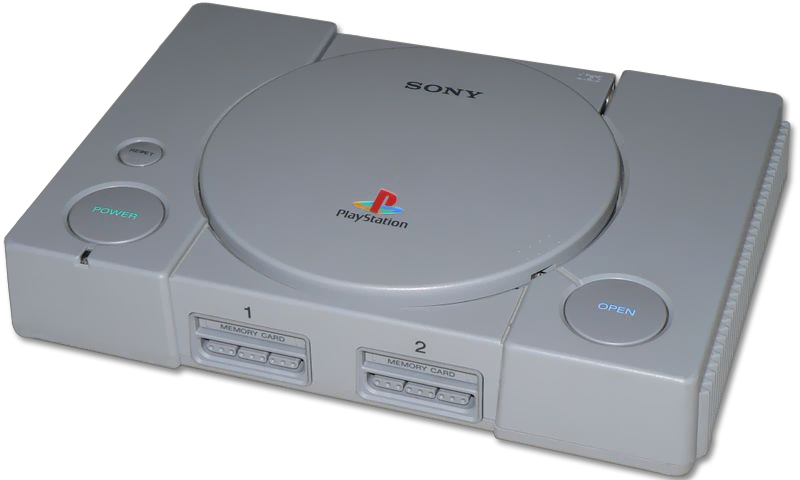
The Sony PlayStation is one of the most revolutionary consoles to have ever been released, the console has sold over 150 million units. The console was played using a Game Pad, the console had 2 controller ports to play multi-player games, it was also one of the first consoles to incorporate a memory card as a means of saving game data. The console used CD's to play games and was also capable of playing Audio CD's. The console had many best sellers that are still remembered today and whose franchises are still expanding. Sony also released later on the Sony Duel Shock Analog controller, which had 2 analog sticks on the pad to give players full 360 degree rotation. This increased the consoles popularity further as people found it much easier to play.


Microsoft Xbox


The Xbox was released in America in 2001 and was the first console to be manufactured by Microsoft, joining the gaming band-wagon a little later than other companies (sixth-generation) Microsoft had to compete with Sony's Playstation 2 and Sega's Dreamcast. Amazingly enough the company sold more than 25 million  units (as of 2008) and had a massive fanbase. The console used a Dual analog game bad which also had a standard D-pad, Shoulder Triggers, A B X Y Face Buttons and the consoles own "Black and White Buttons". On the Xbox up to 4 people could play local split screen which boosted its popularity further. What made Xbox so popular was in addition to its revolutionary graphics and brilliant launch titles was Xbox Live, which was introduced the upcoming November. Players loved this service as many people found it superior to Sony's online Playstation service the only downside being you had to pay for it. The best selling game for the Xbox to date is Halo 2, which grew onto the Xbox 360 and now Halo is Microsofts most popular game series and is recognized globally. It was so popular because players said it was the best online game out there. The console was also the first to use a Hard Drive to save data.


Wednesday, 5 June 2013

RAM


RAM stands for Random Access Memory. Random Access Memory provides space for a computer to read and write data to be accessed by the CPU (central processing unit). When  refering to a computer's memory, it usually mean its RAM.

when adding more RAM to a computer, this would reduce the number of times the CPU must read data from the hard disk.


This usually allows a computer to work considerably faster, as RAM is many times faster than a hard disk. RAM is volatile, so data stored in RAM stays there only as long as a computer is running. As soon as the computer is turned off, the data stored in RAM disappears. When the computer is turned back on again, the computer's uses instructions stored semi-permanently in the ROM chip.


RAM is needed in a game platform to enhance the player's experience of the platform itself. For example It is needed so that the game does notv jerk frequently. If there was no RAM in a console it would cause it run incredibly slow and wouldn't make it in the market.

Tuesday, 4 June 2013

GPU

GPU:

A graphics processing unit (GPU) is a specialized electronic circuit designed to rapidly manipulate and alter memory to accelerate the creation of images in a frame buffer intended for output to a display.

GPU in a phone:

This is a GPU located on the motherboard
of a mobile device.


GPU in a computer:

This is a GPU which can be located inside a compuer.
Due to the size difference, the computer GPU has the
capability to much stronger.


GPU in a games console:


This is a GPU located inside a Play Station 3.


The CPU is a general purposepeice of hardware, often refered to as the brain of a PC. The GPU is specialised for graphics. This means that the GPU is optimised to process trigonometry type processes, this means that they process the triangles in any object displayed on a screen.
CPUs on the other hand are optimised to process more general math for processes overall.

Although CPUs and GPUs are very different they do have a key similarity which is that both peices of hardware, they're both connected to the circuit board that process arthimical and output operations, they both also use "cores" to do any task they undertake.

There are several different API used to communicate with GPU, the main ones are DirectX and VideoToolBox. DirectX is used by Microsoft for Windows on PCs and on the Xbox 360. VideoToolBox is used by Apple for the MAC OS and Apple TV.

A GPU goes through a variety of intense computations to display 3d graphics, this is usualy known a a graphics pipeline. There are various steps of the Grphics Pipeline before the final image can be displayed on screen.

Steps of the Graphics Pipeline:


Per-vertex lighting and shading:

Geometry in a 3D scene is lit according to the different locations of light sources.
Some, (Mostly older) hardware implementations of the Graphics Timeline compute lighting only at the vertices of the polygons being render. The different lighting values of vertices  are then interpolated during the rasterization process.

Clipping:
Geometric primitives that now fall completely outside of the viewing frustum will not be visible and are discarded at this stage to increase work speed and decrease chance of loss of frame rate.

Projection transformation:
In the case of a Perspective projection, objects which are distant from the camera are made smaller. This is achieved by dividing the X and Y coordinates of each vertex of each primitive by its Z coordinate(which represents its distance from the camera).

Viewport transformation:
The post-clip vertices are transformed once again to be in window space. In practice, this transform is very simple: applying a scale (multiplying by the width of the window) and a bias (adding to the offset from the screen origin). At this point, the vertices have coordinates which directly relate to pixels in a raster.

Scan conversion and rasterization:
Rasterization is the process by which the 2D image space representation of the scene is converted into raster format and the correct resulting pixel values are determined. From now on, operations will be carried out on each single pixel. This stage is rather complex, involving multiple steps often referred as a group under the name of pixel pipeline.

Texturing and fragment shading:
At this stage of the pipeline individual fragments (or pre-pixels) are assigned a color based on values interpolated from the vertices during rasterization, from a texture in memory, or from a shader program.

Display:

The final colored pixels can then be displayed on a computer monitor or other display.


Tuesday, 12 February 2013

CPU

CPU

The term CPU is used when talking about computers stands for "Central Processing Unit".
Central Processing Unit is the hardware within a computer system or smartphone which carries out the instructions of a computer program. The operations consist of, basic arithmetical, logical, and input/output operations of the system.
The CPU would be located underneath a fan
Similar to this on any computer.

The CPU is located on the motherboard inside the computer tower. The CPU is located under the heat sink that nearly always has a fan on top of it.


The CPU sits in the motherboard as the central unit. All of the other hardware components and programs installed on the system must go through the CPU before their function can be carried out. The CPU's job function is important and enormous in scale.
When a function, program or piece of data is called, the CPU pulls it from Random Access Memory (RAM) and any other hardware in order to process it. The CPU then reads the instructions associated to the task before sending it back to RAM. The instructions that the CPU receives pertains to calculations and data transportation. The system bus is the trail that the data must travel before it is executed. It is the CPU's job to make sure that the data is guided through the system bus to be processed by the CPU and then on to the next step. With every stop on the system bus, the CPU makes sure that the data gets there in the correct order.

Often known as CPU power, CPU cycles, and various other names, processing power is the ability of a computer to manipulate data. Processing power varies with the architecture (and clock speed) of the CPU. Usually CPUs with higher clock speeds and those supporting larger word sizes have more processing power than slower CPUs supporting smaller word sizes.
A fact about CPU's is that their processing power is fixed, this means that the CPU you can only run so fast before it begins to overheat. and another being that their processing power cannot be stored for later use. In other words, if a CPU can process 100 million instructions in one second, one second of idle time equals 100 million instructions worth of processing that have been wasted.

The reason that the power of a CPU is crucial in a gaming platform is so that the developers know how fast a game can run and how much a console can withstand. the developers wouldn't want their games to be jerky/laggy, they would want a clean, crisp frame rate.


Examples of processors used in the PSONE and the PS3:

PSONE:
R3000A 32bit RISC chip @ 33.8mhz

PS3:
3.2 GHz Power Architecture-based PPE with eight 3.2 GHz SPE

**Describe the PROCESSING CAPABILITIES**


More modern CPU's are known to have what is called "multiple cores". For example an 8-core processor, this means that the CPU has 8 cores, which also gives the CPU the capability to be 8 times better than it would be if it was a single core. The CPU will be given a speed that it can be run at, for example, 3.8 GHz, it won't be able to run any faster than 3.8 GHz but it can split the work load of doing multiple tasks on a computer to optimize the run speed.